Study Notes
Overview
Digital Art (1.7) in the OCR GCSE Art and Design specification challenges candidates to use technology as a creative tool. This is not simply about using a computer to make art, but about demonstrating a deep and critical understanding of how digital processes can be manipulated to create purposeful, meaningful outcomes. Success in this area requires a rigorous and well-documented workflow, similar to a traditional sketchbook, where ideas are developed, refined, and resolved. Candidates must show they can move beyond simple image capture or preset filters to engage in a sophisticated dialogue between their creative intentions and the digital medium.
Key Knowledge & Theory
Core Concepts
Digital Art is built on a foundation of specific technical principles. A core concept is the distinction between Raster and Vector graphics. Raster images, composed of pixels (like a photograph), are resolution-dependent; scaling them up too much causes a loss of quality known as pixelation. Vector graphics, defined by mathematical equations (lines and curves), are resolution-independent and can be scaled to any size without losing clarity. Understanding when to use each is fundamental. For example, a photographic manipulation would be raster-based, while a logo design would be vector-based. Another key concept is non-destructive editing, a workflow where the original image data is preserved. This is achieved through tools like layer masks, adjustment layers, and smart objects, allowing for infinite refinement without permanently altering the source material. Examiners award credit for this professional approach as it demonstrates technical understanding and supports the iterative process of AO2.
Key Practitioners/Artists/Composers
| Name | Period/Style | Key Works | Relevance |
|---|---|---|---|
| David Hockney | Contemporary (Pop Art) | The Arrival of Spring in Woldgate (iPad drawings) | Demonstrates how digital tools (iPad, Brushes app) can be used with traditional drawing principles to capture light and texture. His work is an excellent example of a master artist embracing new technology. |
| James Jean | Contemporary (Illustration) | Fables comic book covers, various commercial work | Jean blends traditional drawing with digital painting in Photoshop, creating complex, layered compositions. His work shows how to integrate line, colour, and texture digitally to create narrative depth. |
| Cory Arcangel | Contemporary (Post-Conceptual Art) | Super Mario Clouds (2002) | Arcangel hacks and modifies existing digital systems (like video games) to create new artworks. He is relevant for showing how technology itself can be the subject and medium, questioning its intended use. |
| Beeple (Mike Winkelmann) | Contemporary (Digital Art) | Everydays: the First 5000 Days | A pioneer in the daily digital art movement, Beeple's work showcases mastery of 3D software (Cinema 4D) and rendering engines. He demonstrates how to build a vast body of work through consistent digital practice. |
Technical Vocabulary
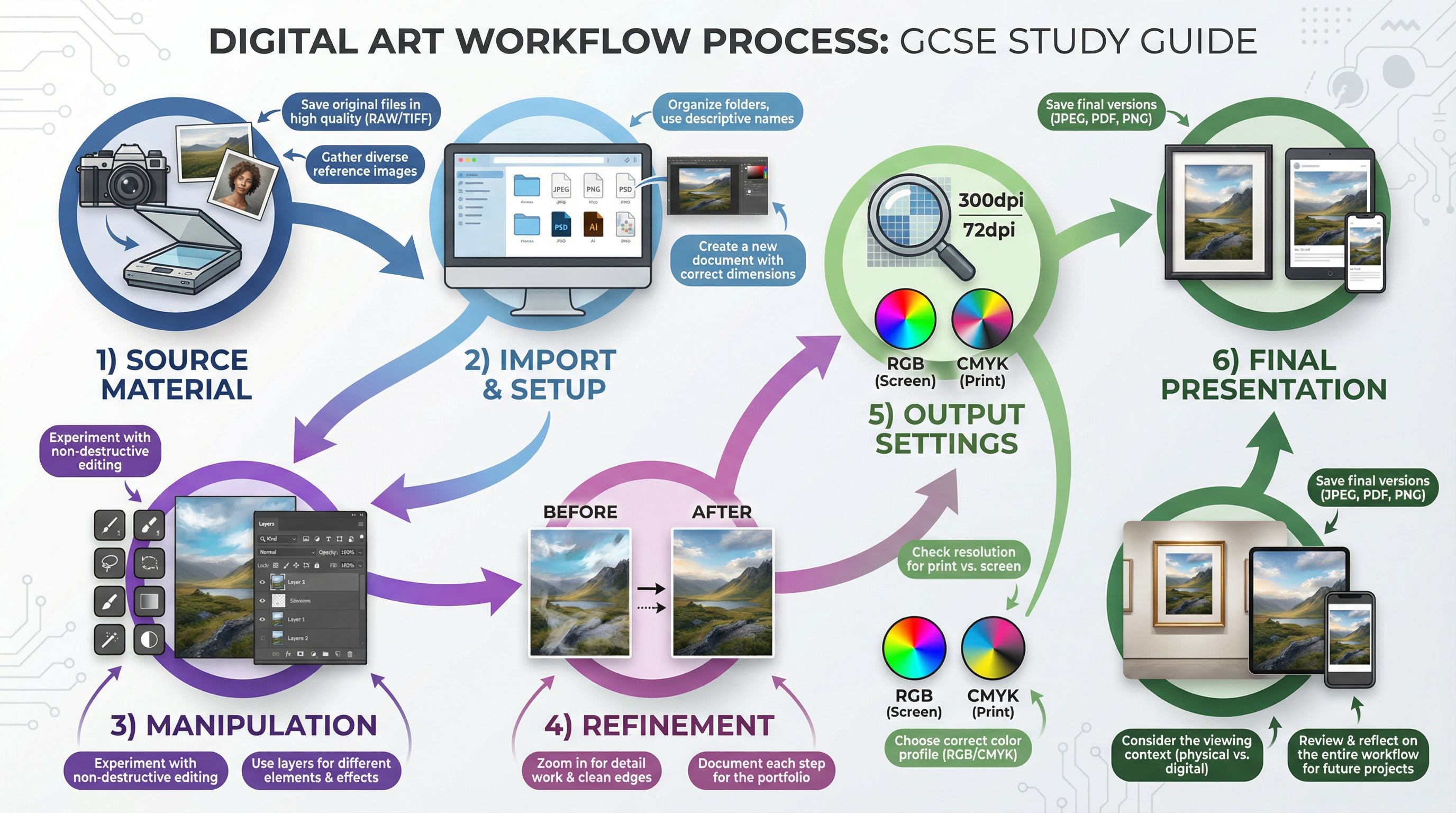
- Resolution: The detail an image holds, typically measured in DPI (Dots Per Inch). 300 DPI is the standard for high-quality print; 72 DPI is for screen-based work.
- Layers: The organisational tool in raster software that allows elements to be stacked and edited independently.
- Blend Modes: Settings that determine how two layers interact with each other (e.g., Multiply, Screen, Overlay).
- Bezier Curve: A mathematically defined curve used in vector graphics for creating smooth, precise paths and selections.
- CMYK/RGB: Colour models. CMYK (Cyan, Magenta, Yellow, Key/Black) is for print. RGB (Red, Green, Blue) is for screens.
- Non-Destructive Editing: A workflow that preserves the original image data, using tools like masks and adjustment layers.
- Pixelation: The undesirable effect when a raster image is scaled up and individual pixels become visible.
- Vector: An image created by mathematical paths, allowing for infinite scaling without loss of quality.
Practical Skills
Techniques & Processes
- Purposeful Selection: Move beyond the magic wand. Master the Pen Tool to create precise selections with Bezier curves. Use a combination of selection tools (Lasso, Quick Selection) and refine them with Select and Mask options.
- Layer Masking: Instead of erasing, use layer masks to non-destructively hide parts of a layer. This allows you to refine compositions and blend elements seamlessly. A black mask hides, a white mask reveals, and shades of grey create semi-transparency.
- Adjustment Layers: For all colour and tonal corrections, use adjustment layers (e.g., Curves, Hue/Saturation, Levels). This allows you to edit your adjustments at any time without degrading the image layer itself.
- Hybrid Practice: Combine digital and traditional media. Scan textures, drawings, or paintings and integrate them into your digital work. Print a digital composition and work back into it with physical media. This demonstrates a broad exploration of materials (AO2).
Materials & Equipment
- Software: Access to a raster-based program (e.g., Adobe Photoshop, GIMP, Procreate) and ideally a vector-based program (e.g., Adobe Illustrator, Inkscape) is essential.
- Hardware: A computer or tablet with sufficient processing power is needed. A graphics tablet (e.g., Wacom) is highly recommended for digital drawing and painting as it offers pressure sensitivity, giving greater control over line weight and opacity.
- Input Devices: A scanner is crucial for importing traditional artwork and textures. A digital camera (or high-quality phone camera) is needed for generating your own primary source photography.
Portfolio/Coursework Guidance
Assessment Criteria
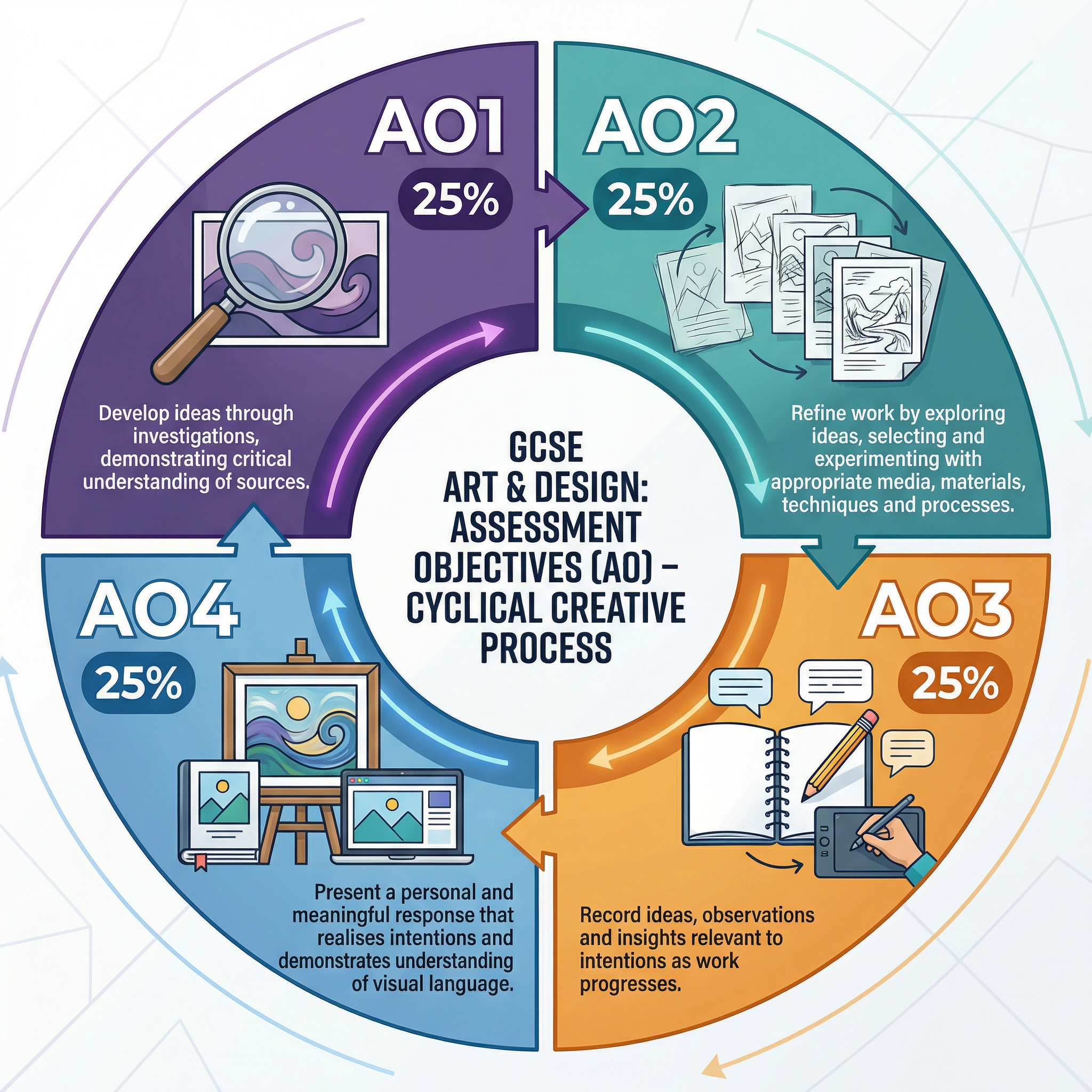
Examiners assess your portfolio against four equally weighted Assessment Objectives (AOs). For Digital Art, this means:
- AO1 (Develop): Research digital artists. Analyse how they use technology to create meaning. Use this research to inform your own ideas.
- AO2 (Refine): Experiment with a wide range of digital tools and techniques. Don't just use one filter; try multiple approaches. Show your iterative process through saved versions and screenshots.
- AO3 (Record): Annotate your digital workflow. Explain your technical choices. Why did you choose a specific blend mode? How does your colour palette support your concept? Use technical vocabulary.
- AO4 (Present): Your final outcome must be a coherent, personal, and meaningful response. It must be technically proficient, considering resolution, colour space, and the intended viewing context (print vs. screen).
Building a Strong Portfolio
Your portfolio must tell the story of your creative journey. For digital work, this means creating a 'digital sketchbook'.
- Save Incrementally: Don't just save over your work. Use
filename_v1.png,filename_v2.png, etc. This provides clear evidence of your development. - Screenshot Everything: Take screenshots of your workspace, especially your layers panel. This shows the complexity of your process and how you've built your image.
- Create Contact Sheets: Arrange your different versions and experiments onto a single page (a digital contact sheet). This allows you to compare iterations and explain your choices.
- Annotate with Intent: Your annotations must be more than descriptive. Explain why you made decisions. Link your technical choices back to your research (AO1) and your overall intentions.
Exam Component
Written Exam Knowledge
While Art and Design is primarily coursework-based, the written component requires you to articulate your understanding of your own work and the work of others. You will need to use the technical vocabulary listed above. You may be asked to analyse an unseen artwork or explain how your own work was influenced by a specific artist. For digital art, you must be able to explain the process, from generating source material to the final output, justifying your choices along the way.
Practical Exam Preparation
For the externally set assignment (the practical exam), you will have a preparatory period to develop ideas. If you choose a digital approach:
- Test Your Workflow: Ensure you are confident with your chosen software and hardware. The exam has a time limit, so you need to be efficient.
- Prepare Digital Assets: During the prep period, you can create a bank of your own digital assets (textures, brushes, source images) that you can use in the timed exam.
- Plan for Technical Issues: Have a backup plan. Save your work frequently and in multiple locations (e.g., cloud storage and a USB drive). Know what to do if software crashes.