Study Notes
Overview
Welcome to the definitive guide for Programming Fundamentals (2.2) for the Edexcel GCSE Computer Science specification. This topic is the absolute bedrock of your practical programming skills and is primarily assessed in the onscreen Paper 2 exam. A strong command of these fundamentals is not just about memorising Python syntax; it's about learning to think like a programmer to solve computational problems. In this section, you will learn how to declare and use variables, manipulate different types of data, and control the flow of your programs using sequence, selection, and iteration. Typical exam questions will require you to write code from scratch, debug existing code, or complete a partially written program. Mastering this area is crucial as it links to almost every other topic in the specification, from algorithms to data representation.
Key Concepts
Concept 1: Variables and Data Types
A variable is a named location in memory used to store data that can be changed. Think of it as a labelled box where you can keep a piece of information. For your exam, you must use meaningful identifier names (e.g., user_age instead of x) as marks are awarded for readability.
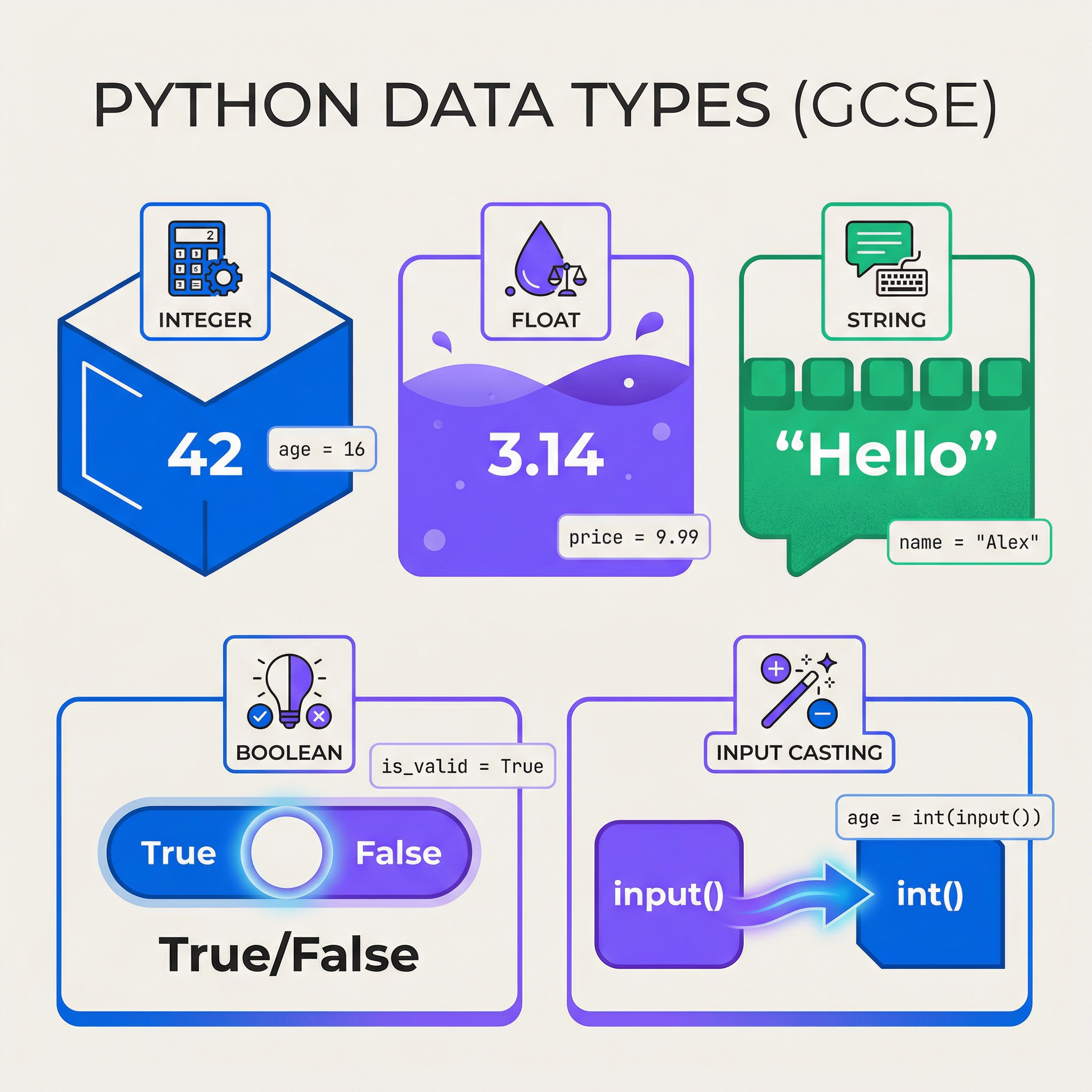
Data types define the kind of data a variable can hold. Getting these right is critical for avoiding errors. The main types are:
- Integer (
int): Whole numbers, positive or negative (e.g.,10,-5,0). - Float (
float): Numbers with a decimal point (e.g.,9.99,-3.14). - String (
str): Text, enclosed in single or double quotes (e.g.,\'Hello World\',"Python"). - Boolean (
bool): Represents one of two values:TrueorFalse. Crucial for controlling selection and iteration.
Why it works: Python is a dynamically typed language, meaning you don't have to declare the data type of a variable. However, the interpreter still enforces type rules. Trying to add a string to an integer will cause a TypeError. This is why understanding and converting types (casting) is so important.
Example: A common mistake is mishandling input. The input() function always returns a string. To perform maths, you must cast it:
python
WRONG: This will cause a TypeError or logical error
age_str = input("Enter your age: ")
age_in_five_years = age_str + 5 # This would crash!
CORRECT: Cast the string to an integer
age_int = int(input("Enter your age: "))
age_in_five_years = age_int + 5
print(f"In five years, you will be {age_in_five_years} years old.")
Concept 2: Control Structures
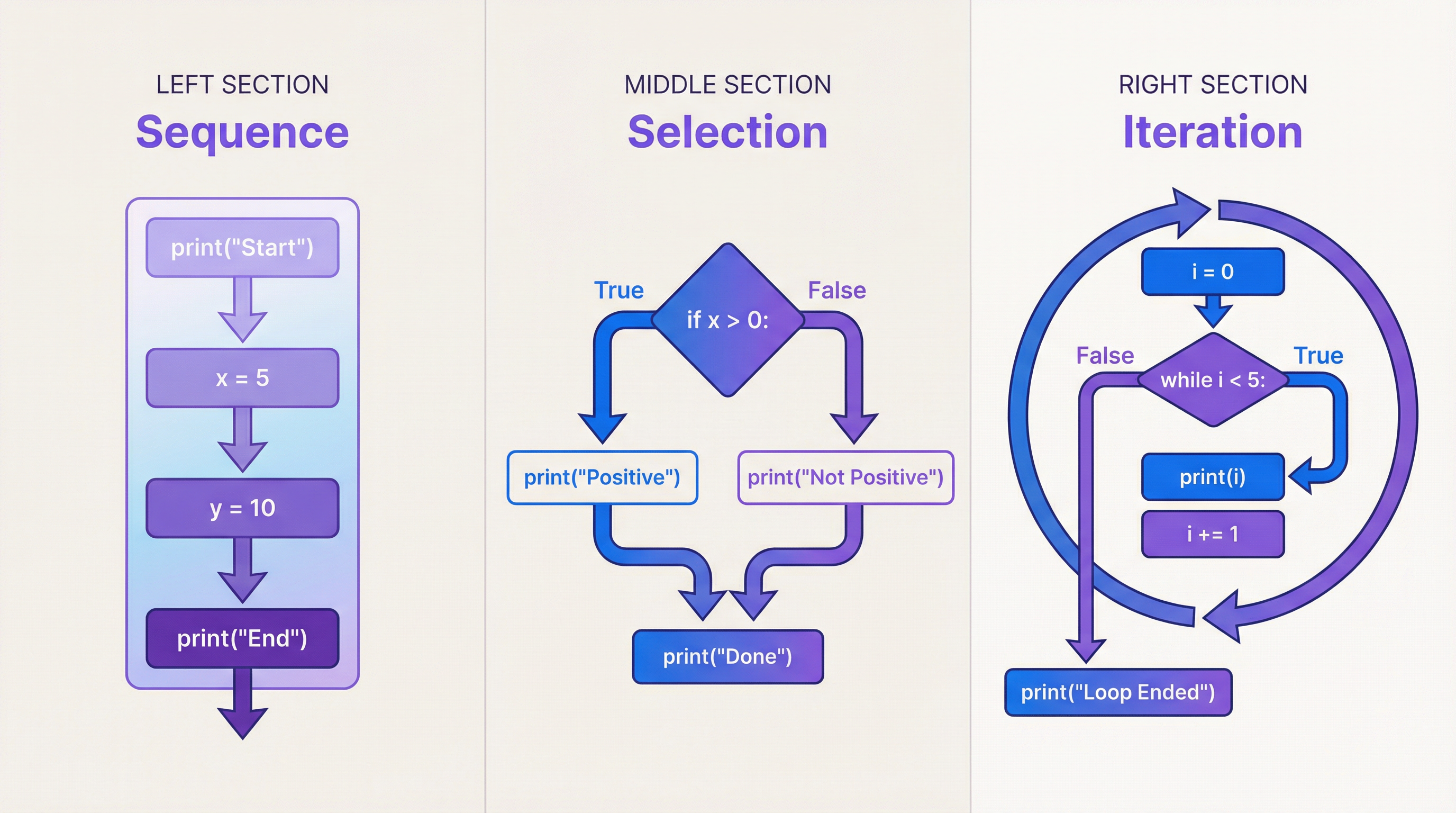
Control structures dictate the order in which the statements in your program are executed. There are three fundamental types you must master.
-
Sequence: This is the default control structure. Code is executed line-by-line, from top to bottom, without skipping any lines.
-
Selection: This is used for making decisions. In Python, this is achieved with
if,elif(else if), andelsestatements. The program will choose which block of code to execute based on whether a condition isTrueorFalse.Example:
python
score = int(input("Enter your score: "))
if score >= 70:
print("Grade: A")
elif score >= 60:
print("Grade: B")
else:
print("Grade: C or below")Examiner Tip: A colon (
:) must follow everyif,elif, andelsestatement. The code block that follows must be indented. Forgetting either is a common syntax error that will lose you marks. -
Iteration: This is used for repeating a block of code. This is also known as looping. There are two main types of loops in Python:
- Count-Controlled (
forloop): Repeats a set number of times. It is often used with therange()function.
Example:for i in range(5):will loop 5 times (withibeing 0, 1, 2, 3, 4). - Condition-Controlled (
whileloop): Repeats as long as a specified condition isTrue. It is vital that something inside the loop changes to eventually make the conditionFalse, otherwise you create an infinite loop.
Example: Awhileloop to validate input.
python
password = ""
while password != "secret123":
password = input("Enter password: ")
print("Access granted.")
- Count-Controlled (
Mathematical/Scientific Relationships
While Programming Fundamentals is not heavily mathematical, you will use arithmetic and comparison operators. It is critical to know the difference.
| Operator | Description | Example | Result if x=10, y=3 | Must Memorise |
|---|---|---|---|---|
+ | Addition | x + y | 13 | Yes |
- | Subtraction | x - y | 7 | Yes |
* | Multiplication | x * y | 30 | Yes |
/ | Division | x / y | 3.333... | Yes |
// | Floor/Integer Division | x // y | 3 | Yes |
% | Modulo (remainder after division) | x % y | 1 | Yes |
** | Exponentiation (to the power of) | x ** y | 1000 | Yes |
== | Equal to (Comparison) | x == y | False | Yes |
!= | Not equal to | x != y | True | Yes |
> | Greater than | x > y | True | Yes |
< | Less than | x < y | False | Yes |
>= | Greater than or equal to | x >= 10 | True | Yes |
<= | Less than or equal to | x <= y | False | Yes |
Practical Applications
Programming fundamentals are used everywhere!
- Web Development: Validating a user's password length (
whileloop,len()function). - Game Design: Checking if a player's health is greater than 0 (
ifstatement). - Data Science: Looping through millions of data points to calculate an average (
forloop). - Mobile Apps: Responding to a user tapping a button (sequence and selection).
In your Paper 2 exam, you will apply these fundamentals to solve practical problems, such as creating a simple calculator, a quiz program, or a system to manage stock levels. The key is to break the problem down and identify which control structures and data types are needed for each part.