Wired and Wireless Networks

    Master OCR GCSE Computer Science Topic 2.2: Wired and Wireless Networks. This guide breaks down everything from LANs and WANs to network topologies, hardware, and the crucial TCP/IP model, ensuring you're ready to secure every mark in the exam.

    6
    Min Read
    3
    Examples
    5
    Questions
    6
    Key Terms
    πŸŽ™ Podcast Episode
    Wired and Wireless Networks
    0:00-0:00

    Study Notes

    Header image for Wired and Wireless Networks

    Overview

    Welcome to your deep dive into Wired and Wireless Networks, a fundamental and heavily-weighted topic in the OCR GCSE Computer Science specification (2.2). This area explores how computers connect to share data, from a small office network to the vast global internet. Understanding this topic is crucial as it forms the backbone of modern computing and is a guaranteed feature in your exam, often tested through a mix of short-answer definition questions and longer, evaluative 8-mark questions. You'll see how this topic provides essential context for understanding cybersecurity (Topic 2.3) and how data is stored and accessed from the cloud. Get ready to explore the hardware, rules, and structures that make our connected world possible.

    Listen to our 10-minute podcast guide to master Wired and Wireless Networks.

    Key Concepts

    Concept 1: LAN vs. WAN

    A network is simply two or more computers connected together to share resources. The two main types you need to know are Local Area Networks (LANs) and Wide Area Networks (WANs). The distinction is a frequent source of exam marks.

    • LAN (Local Area Network): Covers a small geographical area, like a single building or a school campus. The most important characteristic for your exam answer is that the organisation owns and controls all its own network infrastructure (cables, switches, servers). Data transmission speeds are typically very high.

    • WAN (Wide Area Network): Covers a large geographical area, connecting LANs together over cities, countries, or even continents. The critical detail is that WANs use hired or third-party infrastructure, such as fibre optic lines from telecommunication companies like BT or Virgin Media. The internet is the largest example of a WAN.

    Concept 2: Network Topologies

    Topology refers to the layout or structure of a network. You must be able to describe and evaluate the Star, Bus, and Mesh topologies.
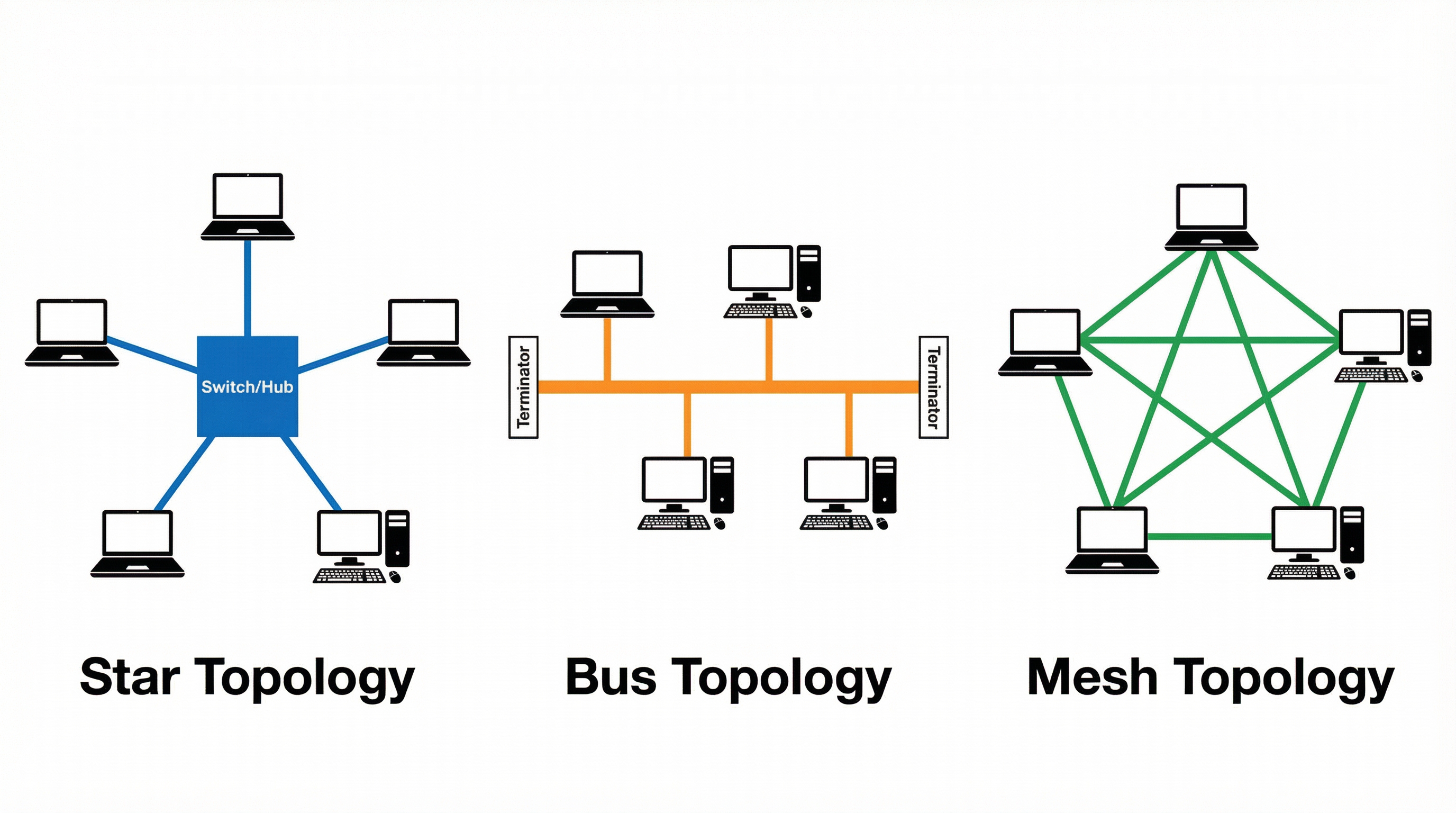
    A comparison of Star, Bus, and Mesh network topologies.

    • Star Topology: All devices are connected to a central hub or switch. This is the most common topology in modern LANs. Its main advantage is reliability; if one cable fails, only that single device is affected. The central switch also improves performance by sending data only to the intended recipient.

    • Bus Topology: An older design where all devices are connected to a single backbone cable with a terminator at each end. It's cheap to set up, but suffers from a major drawback: if the backbone cable fails, the entire network goes down. Data collisions are also common, as all data travels along the same wire, slowing the network.

    • Mesh Topology: In a full mesh, every device is connected to every other device. This provides excellent redundancy and fault tolerance, as data can be rerouted if a connection fails. However, it is expensive and complex to cable, making it rare for wired LANs but common in wireless networks.

    Concept 3: Network Hardware

    Candidates frequently confuse the roles of different network hardware. You must be precise.

    • Switch: Operates on a LAN to connect multiple devices. It intelligently filters and forwards data packets to their intended destination by reading the MAC address of each device. This prevents data collisions and improves security.

    • Router: Connects different networks together (e.g., a LAN to a WAN). It uses IP addresses to direct packets to their destination network. Your home router connects your local network to the internet.

    • Wireless Access Point (WAP): Allows wireless devices to connect to a wired network. It acts as a bridge between the wireless and wired parts of a LAN.

    • Network Interface Card (NIC): A hardware component inside a computer that allows it to connect to a network. Each NIC has a unique, hard-coded MAC address.

    Concept 4: Wireless Networking

    Wireless networks transmit data using radio waves. The two key frequency bands you need to compare are 2.4GHz and 5GHz.
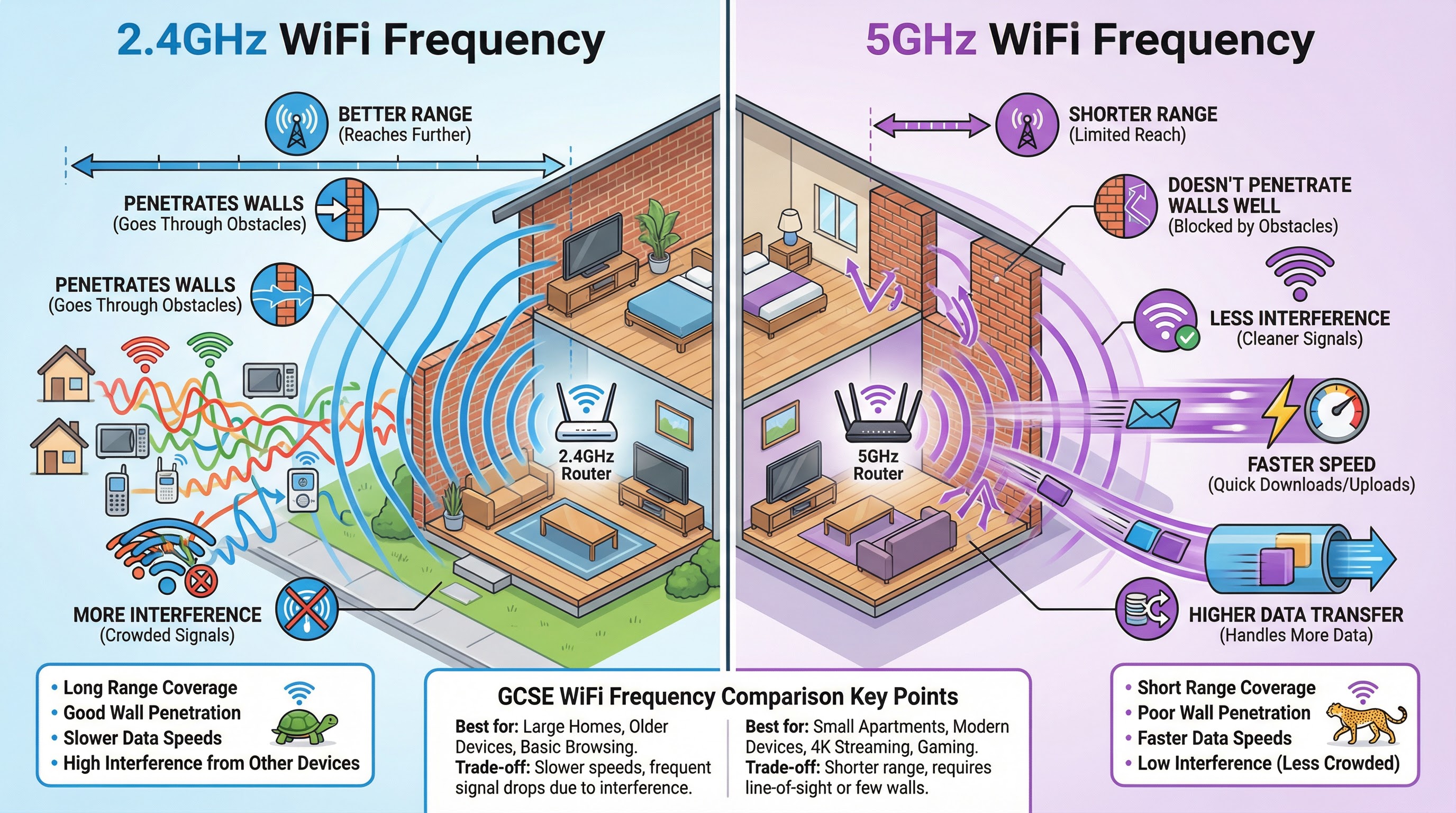
    Comparison of 2.4GHz and 5GHz WiFi frequencies, showing the trade-off between range and speed.

    • 2.4GHz Band: Offers greater range and is better at penetrating solid objects like walls. However, it is more susceptible to interference from other devices (microwaves, Bluetooth) and generally has slower data transfer speeds.

    • 5GHz Band: Provides faster data transfer speeds and suffers from less interference. Its main drawbacks are a shorter range and being more easily blocked by walls and other obstacles.

    Concept 5: The TCP/IP Four-Layer Model

    TCP/IP is a protocol stackβ€”a set of rules that governs how data is transmitted over a network. You must know the four layers in order and their functions.
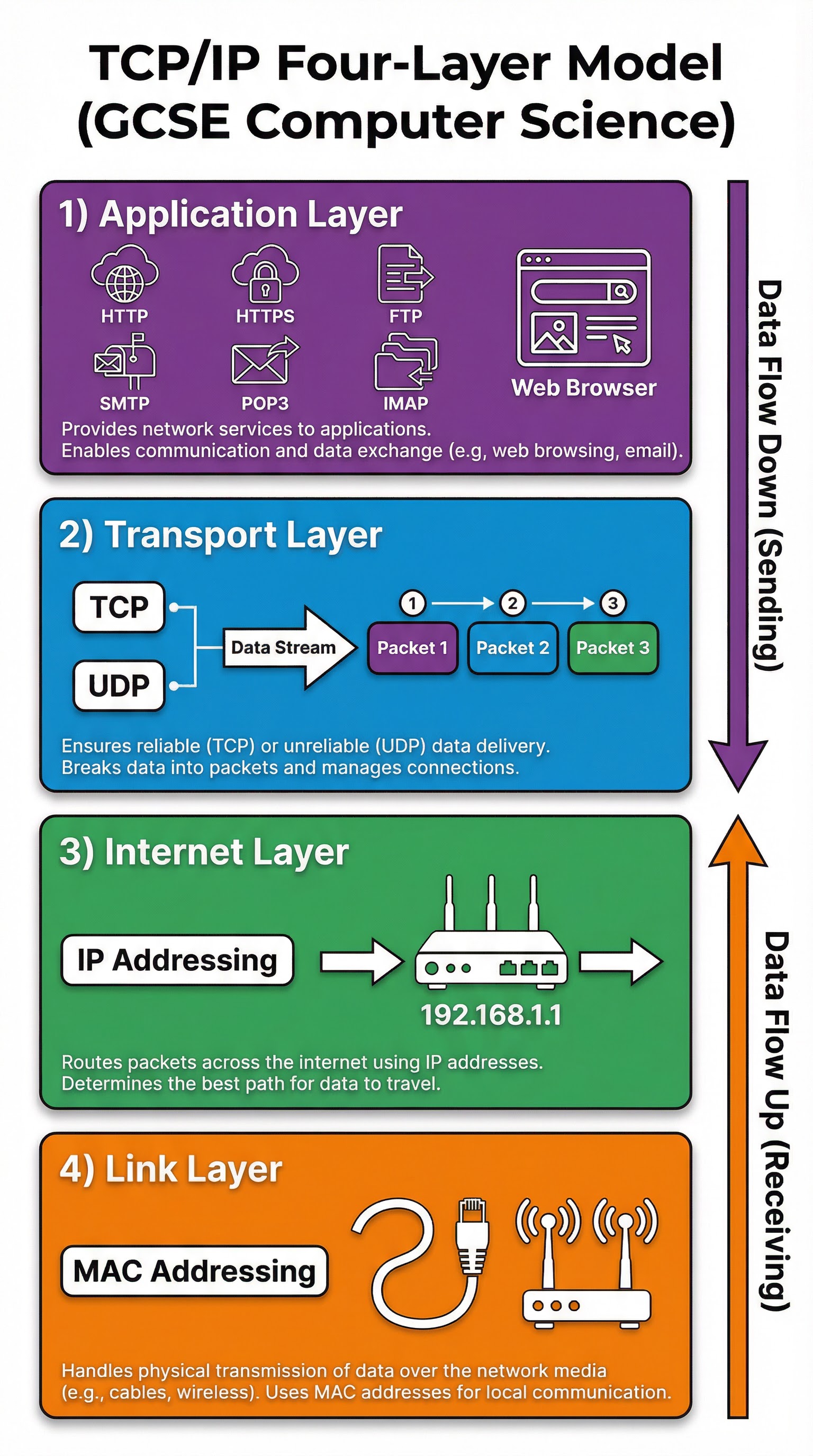
    The TCP/IP Four-Layer Model with key protocols and functions.

    1. Application Layer: Where network applications, such as web browsers or email clients, operate. Protocols like HTTP, HTTPS, SMTP, and FTP are found here.
    2. Transport Layer: Splits the data into smaller packets (using TCP) and adds packet numbers so they can be reassembled correctly at the destination. It manages the connection between the two hosts.
    3. Internet Layer: Adds the source and destination IP addresses to each packet. This is where routing happens, using routers to forward packets across networks.
    4. Link Layer: The physical layer of the network. It adds the MAC address of the source and destination devices and handles the physical transmission of data over cables or radio waves.

    Concept 6: DNS (Domain Name System)

    The DNS acts as the internet's phonebook. Humans access websites using memorable domain names (e.g., www.ocr.org.uk), but computers communicate using IP addresses. The DNS is responsible for translating domain names into their corresponding IP addresses. When you type a URL, your computer sends a request to a DNS server, which looks up the IP address and returns it, allowing your browser to connect to the correct web server.

    Visual Resources

    3 diagrams and illustrations

    A comparison of Star, Bus, and Mesh network topologies.
    A comparison of Star, Bus, and Mesh network topologies.
    The TCP/IP Four-Layer Model with key protocols and functions.
    The TCP/IP Four-Layer Model with key protocols and functions.
    Comparison of 2.4GHz and 5GHz WiFi frequencies, showing the trade-off between range and speed.
    Comparison of 2.4GHz and 5GHz WiFi frequencies, showing the trade-off between range and speed.

    Interactive Diagrams

    2 interactive diagrams to visualise key concepts

    User enters URL: www.example.comBrowser sends request to DNS ServerDNS Server looks up IPDNS returns IP: 93.184.216.34Browser requests page from IP

    Flowchart showing the steps of a DNS lookup.

    ReceiverSenderApplication Layer: DataTransport Layer: Segments into PacketsInternet Layer: Adds IP AddressLink Layer: Adds MAC AddressNetwork Medium: Ethernet/WiFiLink Layer: Reads MACInternet Layer: Reads IPTransport Layer: Reassembles PacketsApplication Layer: Presents Data

    Diagram showing how data flows down the TCP/IP layers for sending and up for receiving.

    Worked Examples

    3 detailed examples with solutions and examiner commentary

    Practice Questions

    Test your understanding β€” click to reveal model answers

    Q1

    State the purpose of a MAC address. [1 mark]

    1 marks
    foundation

    Hint: Think about which piece of hardware uses this address and on what type of network.

    Q2

    Describe the role of the Transport Layer in the TCP/IP model. [3 marks]

    3 marks
    standard

    Hint: Think about how large files are sent over a network. What needs to happen to them first?

    Q3

    A business is setting up a new office. The manager decides to use a wired LAN. Explain one benefit and one drawback of using a wired connection compared to a wireless connection. [4 marks]

    4 marks
    standard

    Hint: Think about speed, security, and convenience.

    Q4

    Explain why a network might use both the 2.4GHz and 5GHz frequency bands. [4 marks]

    4 marks
    challenging

    Hint: Consider the different strengths of each band and how they could complement each other.

    Q5

    A school has a bus network topology. The headteacher is complaining the network is slow and unreliable. Evaluate the school's decision to use a bus topology. [8 marks]

    8 marks
    challenging

    Hint: This is an 'evaluate' question. You need to consider both the pros and cons of a bus topology and then make a final judgement.

    Key Terms

    Essential vocabulary to know

    More Computer Science Study Guides

    View all

    Data representation

    OCR
    GCSE

    This guide demystifies how computers represent everything from numbers to images and sound using only binary. Master the core concepts of data representation for your OCR GCSE Computer Science exam and learn how to secure top marks with examiner insights and multi-modal resources.

    Algorithms

    OCR
    A-Level

    Master OCR A-Level Computer Science Algorithms (2.1) with this comprehensive guide. We'll break down algorithm analysis using Big O notation, explore standard sorting and searching algorithms, and demystify pathfinding with Dijkstra's and A*. This guide is packed with exam-focused advice, worked examples, and memory hooks to help you secure top marks.

    Problem Analysis

    OCR
    GCSE

    Master the core of computational thinking for your OCR GCSE Computer Science exam. This guide breaks down Problem Analysis (3.1) into easy-to-understand concepts, showing you how to decompose problems, use abstraction, and think algorithmically to secure top marks.

    Testing and Evaluation

    OCR
    GCSE

    Testing and Evaluation (3.4) is a critical component of the OCR GCSE Computer Science specification, focusing on the systematic validation of software through test data selection, trace table execution, and error identification. This topic assesses your ability to distinguish between Normal, Boundary, and Erroneous test data, execute trace tables to identify logic errors, and differentiate between iterative testing during development and final testing after implementation. Mastering this topic is essential because it directly applies to real-world software development and is heavily tested across multiple question formats in the exam.

    Boolean Algebra

    OCR
    GCSE

    Master Boolean Algebra for your OCR GCSE Computer Science exam. This guide breaks down logic gates, truth tables, and circuit diagrams into easy-to-understand concepts, packed with examiner tips and interactive content to help you secure top marks in Component 02."

    Common Programming Languages (Python, Java)

    OCR
    GCSE

    This topic explores the fundamental differences between high-level and low-level programming languages, the mechanics of translators (compilers and interpreters), and the essential facilities provided by Integrated Development Environments (IDEs). Understanding these concepts is crucial for scoring marks in OCR's written papers, where precise terminology and the ability to compare translation methods are frequently assessed.