
Study Notes
Overview
Welcome to your guide for Edexcel GCSE Computer Science, Topic 2.6: Programming Languages. This topic is fundamental to understanding how we communicate with computers. It explores the bridge between human-readable instructions and the binary that processors execute. You'll learn about the different "levels" of language, from the abstract and powerful high-level languages to the processor-specific low-level ones. A key focus for examiners is your ability to precisely describe the translation process, distinguishing between compilers, interpreters, and assemblers. This topic frequently links to software development (Topic 2.3) and understanding the CPU (Topic 1.1), so a solid grasp here is crucial for synoptic questions. Expect questions that ask you to 'State', 'Describe', and 'Compare' the features, advantages, and disadvantages of different languages and translators.
Key Concepts
Concept 1: Levels of Programming Language
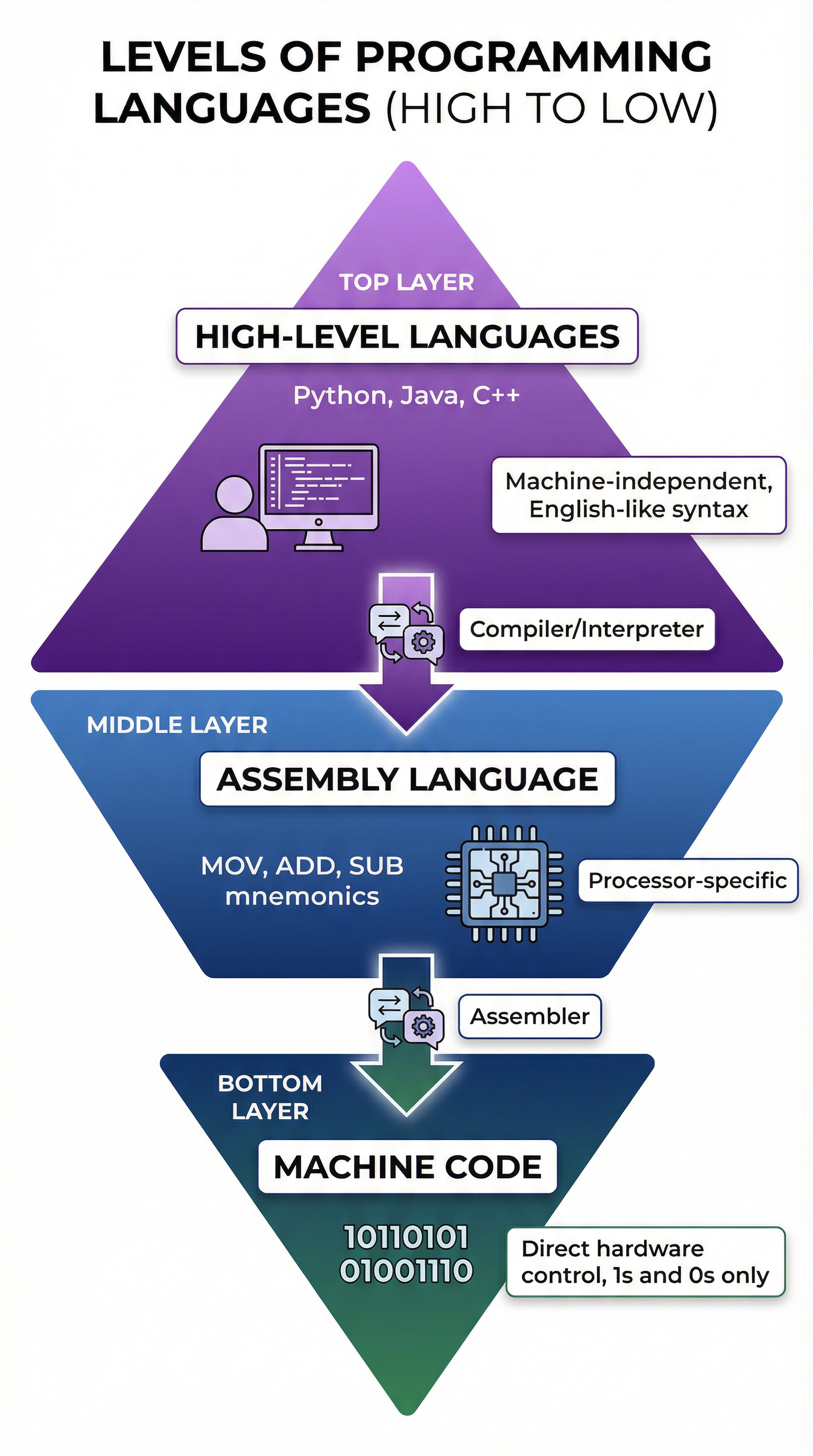
Programming languages are the tools we use to write software, but they exist at different levels of abstraction. Think of it like communicating with someone who speaks a different language. You could learn their native tongue (very difficult, but precise) or use a translator to speak your own language (easier, but less direct). This is the core difference between low-level and high-level languages.
High-Level LanguagesThese are languages like Python, Java, C#, and Visual Basic. They are called "high-level" because they are far removed from the computer's internal workings.
- Human-Readable: Their syntax is designed to be close to natural human language, using familiar words and structures. This makes them easier to learn, write, and debug.
- Machine-Independent: A key feature that earns marks is portability. High-level code can be run on different types of processors and computer systems with little to no modification. The translator (compiler or interpreter) handles the job of converting it for the specific hardware.
- Powerful Abstractions: They provide built-in functions and libraries that handle complex tasks (like network communication or file handling) in a single command. This allows developers to be more productive.
Low-Level LanguagesThese languages are much closer to the hardware.
- Assembly Language: This is one step above machine code. It uses short, memorable codes called mnemonics (e.g.,
MOV,ADD,STO) to represent machine code instructions. It is processor-specific, meaning assembly code written for an Intel CPU won't work on an ARM CPU. It gives programmers direct control over system hardware, like memory addresses and CPU registers. - Machine Code: This is the lowest level possible. It consists of pure binary (1s and 0s) that the CPU can understand and execute directly. It is incredibly difficult for humans to write but is the ultimate destination for all translated code.
Concept 2: Translators (Compilers, Interpreters, Assemblers)
Since a CPU can only understand machine code, any program written in a high-level or assembly language must be translated. This is done by a special piece of software called a translator.
AssemblerThe simplest translator. Its only job is to convert assembly language mnemonics into the corresponding machine code instructions. It's a one-to-one process.
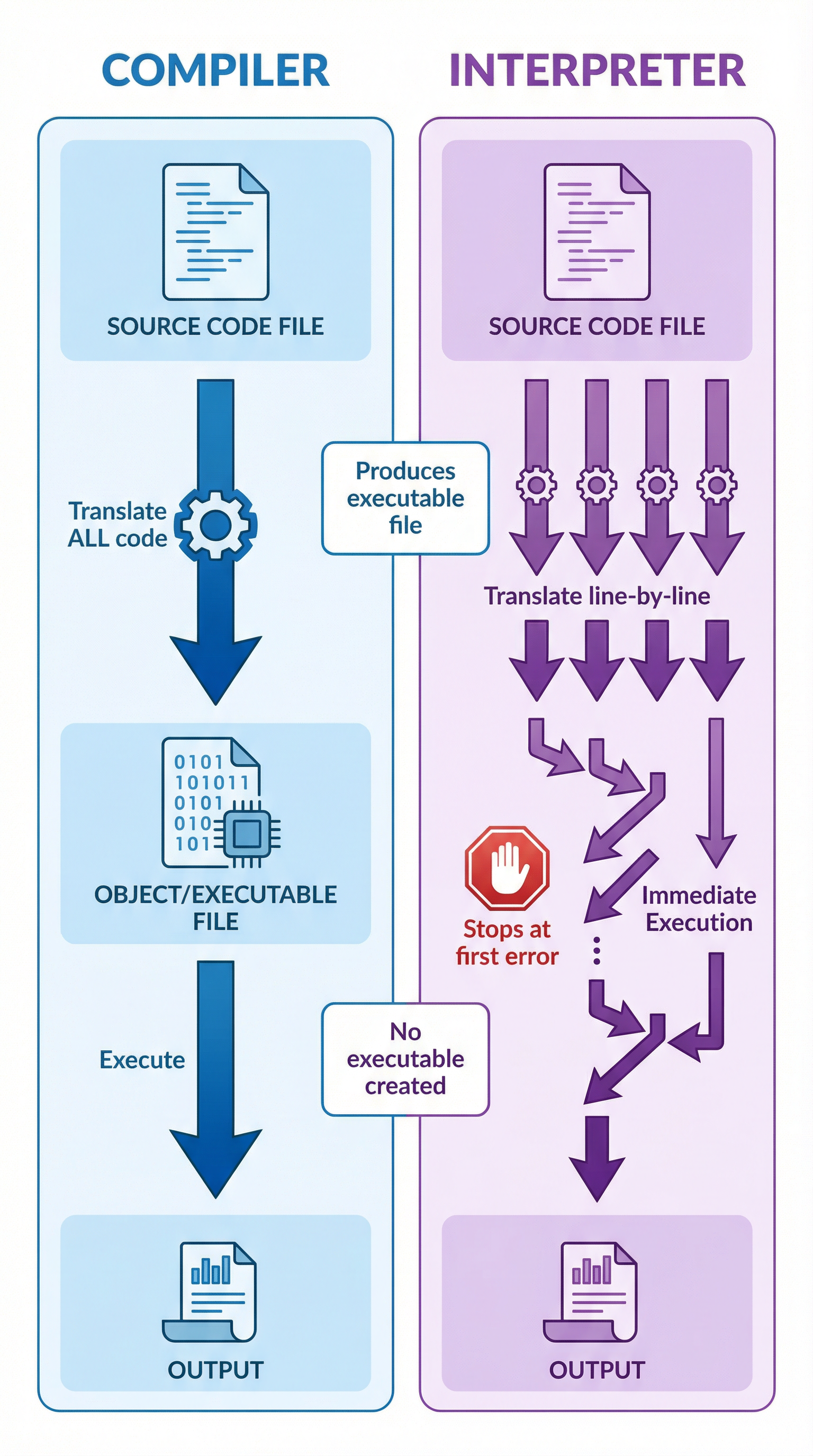
CompilerA compiler takes the entire source code file (the code you write) and translates it all at once into a new file. This new file is called object code or an executable file (.exe on Windows).
- Process: Translates the whole program before execution.
- Output: Creates a standalone executable file that can be run without the compiler or the original source code.
- Error Handling: Reports a list of all syntax errors found in the code only after attempting to compile the entire program.
- Execution Speed: The initial compilation can be slow, but the resulting executable runs very quickly because the translation is already complete.
InterpreterAn interpreter works differently. It translates and executes the source code line by line.
- Process: Translates one line, executes it, translates the next, executes it, and so on.
- Output: Does not produce an executable file. The interpreter and the source code are needed every time the program is run.
- Error Handling: Stops execution at the first line where a syntax error is found. This makes it very useful for debugging.
- Execution Speed: Slower than a compiled program because the translation happens during runtime.
Concept 3: Integrated Development Environments (IDEs)
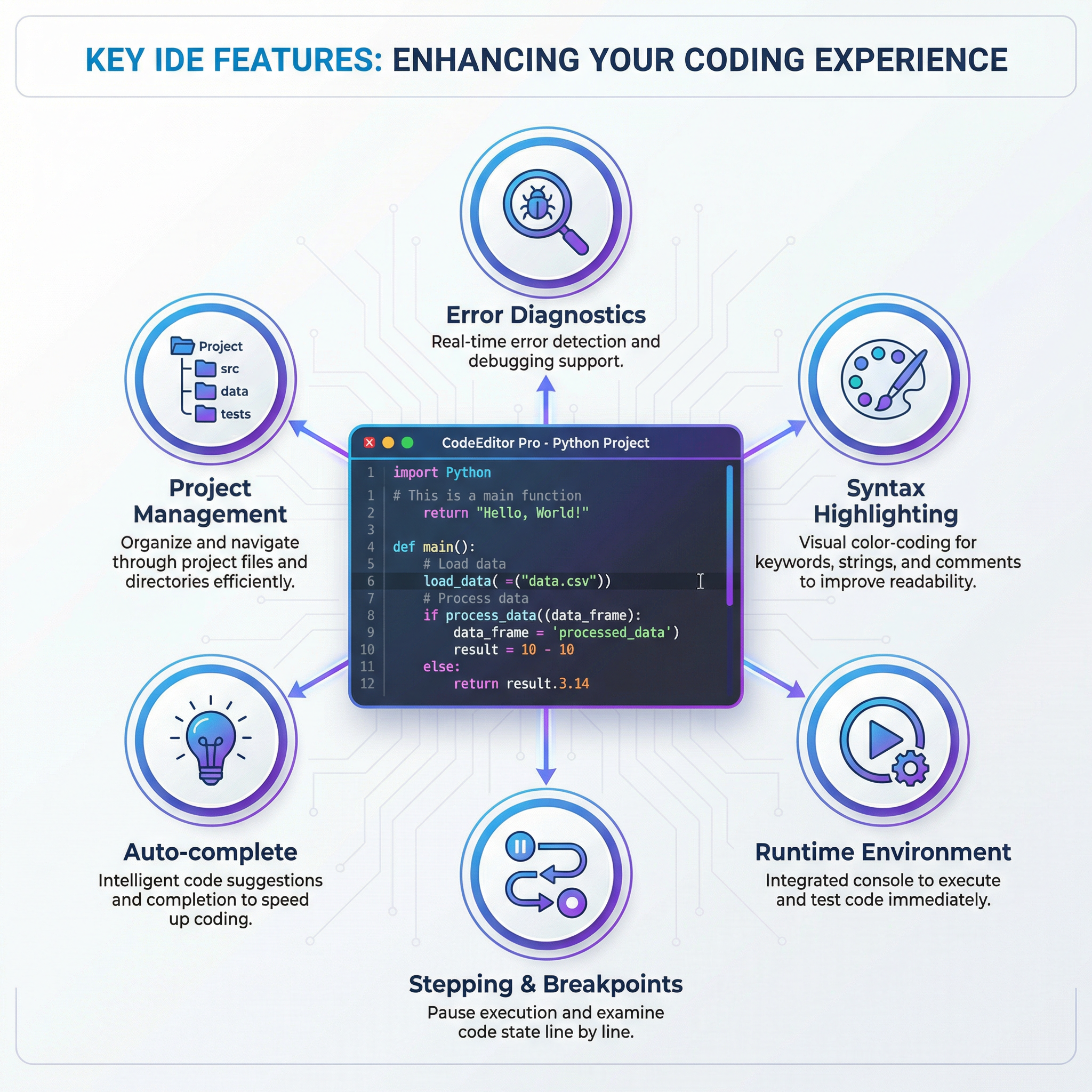
An IDE is a software application that provides a comprehensive set of tools for programmers to write, test, and debug software. It is not a programming language itself. Think of it as a professional workshop for a developer. For the exam, you must name specific features to get marks.
- Source Code Editor: The main text editor with features like syntax highlighting (coloring keywords, strings, and comments differently to improve readability) and auto-completion (suggesting code as you type).
- Error Diagnostics (Debugger): Tools that help find and fix errors. This includes highlighting syntax errors as you type and providing features like breakpoints (pausing execution at a specific line) and stepping (executing code line by line) to inspect the state of variables.
- Runtime Environment: Allows the programmer to run the code and see the output directly within the IDE.
- Translator: The compiler and/or interpreter is often built into the IDE.
Practical Applications
- Web Development: High-level languages like JavaScript, Python (with Django), and PHP are used to create websites and web applications. They are interpreted so that changes can be seen instantly.
- Game Development: High-performance games often use C++, a compiled language, for their core engines to ensure maximum speed. Scripting within the game might use a high-level language like Lua.
- Operating Systems & Drivers: Critical system software that needs direct hardware control is written in low-level languages like C and Assembly Language.
- Data Science & AI: Python, a high-level interpreted language, dominates this field due to its vast collection of libraries (like NumPy and TensorFlow) that make complex mathematical operations simple to write.